1. Overview
The Trip Locations Type doctype is designed to manage different types of locations associated with trips in the VSD Fleet MS module. It enables the tracking and categorization of locations with details such as arrival and departure dates, as well as specific types of locations like loading and offloading points.
2. Key Features
- Location Type: A unique identifier for the type of location (e.g., pickup, delivery, resting point).
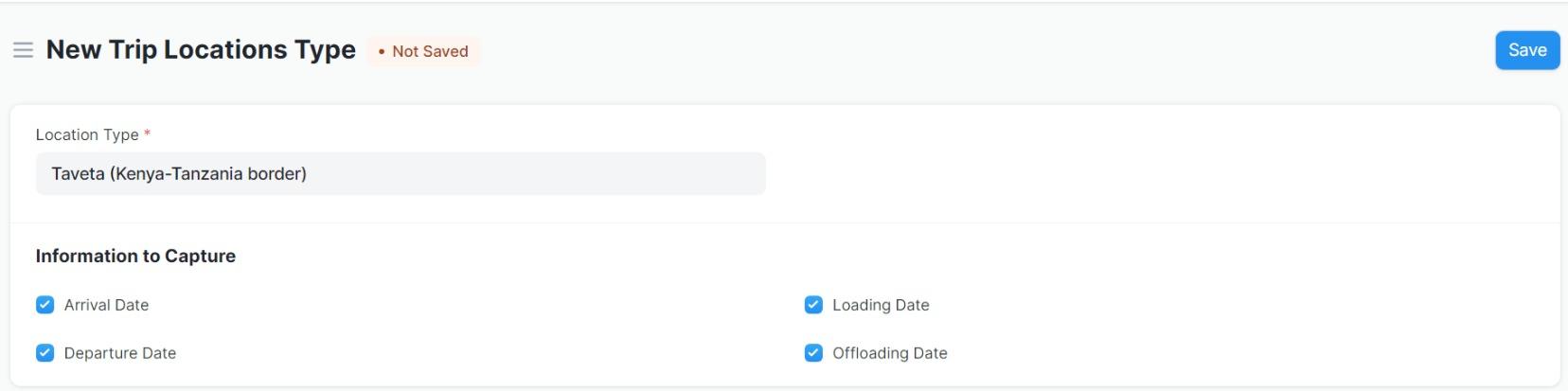
- Arrival Date: Checkbox to track if the arrival date for the location is captured.
- Departure Date: Checkbox to track if the departure date for the location is recorded.
- Loading Date: Checkbox to track if the loading date for the location is logged.
- Offloading Date: Checkbox to track if the offloading date for the location is recorded.
- Customizable Fields: The ability to track specific location-related information per trip.
3. Pre-Requisites
- VSD Fleet MS Module: This doctype is part of the VSD Fleet MS module, so the module must be installed and configured in your system.
- Access Rights: Ensure that the relevant user roles (e.g., System Manager) have the necessary permissions to create, edit, and view entries in the Trip Locations Type doctype.
4. Step-by-Step Usage
a) Creating a Trip Location Type
- Navigate to the Trip Locations Type doctype in the VSD Fleet MS module.
- Click on New to create a new entry.
- Enter the Location Type in the provided field. This is the unique identifier for the location type (e.g., "Pickup", "Delivery").
- Set checkboxes for Arrival Date, Departure Date, Loading Date, and Offloading Date as per the required details for the trip.
- Save the record to confirm the trip location type.
b) Viewing and Editing a Trip Location Type
- Go to the Trip Locations Type list view.
- Click on the record to open it.
- Edit the fields as required (e.g., updating the dates or modifying the location type).
- Save the changes.
This is form used to fill trip location type;
5. Script Customizations
You can customize the behavior of the Trip Locations Type doctype by modifying the Python script:
- Custom validation logic: Add checks or transformations before the document is saved.
- Event-based logic: Trigger actions like notifications or updates based on certain conditions (e.g., when the "Loading Date" is checked).
6. Troubleshooting (Common Errors and Resolutions)
Error 1: Missing Field Data
- Problem: The user encounters an error when saving the document due to missing mandatory fields (like Location Type).
- Resolution: Ensure that all required fields (marked with a red asterisk) are populated before saving the record.
Error 2: Incorrect Date Formatting
- Problem: The date-related fields like Arrival Date are not accepting the input or displaying incorrectly.
- Resolution: Check the date formats being entered. Ensure the fields are used correctly as checkboxes and not as date fields.
7. User Roles and Permissions
- System Manager: Full permissions to create, read, update, and delete records.
- Custom Roles: Permissions can be granted based on specific requirements, ensuring users can interact with the Trip Locations Type as needed.
8. Key Notes
- The Location Type field must be unique for each entry. It is used to distinguish between different types of locations.
- The checkboxes for Arrival Date, Departure Date, Loading Date, and Offloading Date help track the critical events associated with the trip location.
- The Trip Locations Type doctype serves as a way to efficiently categorize and manage trip-related locations.
9. What Business Process Pain Point Does It Help Remove
The Trip Locations Type doctype addresses the complexity of tracking and managing different location types associated with a fleet management system. By defining location types and their corresponding dates, it helps streamline the trip management process, reduce manual tracking, and ensure that key location events are captured in a structured manner.